Saturday, 14 March 2015

Visual storytelling

What is Visual Storytelling ?   

This subject called visual storytelling .What actually is this ? 

Visual storytelling uses graphic design, infographics, illustration, and photography to convey information in the most elegant, entertaining, and informative way. Today, the creative scope of existing visual storytelling techniques is being expanded to meet the formidable challenge of extracting valuable news, surprising findings, and relevant stories from a daily flood of data head on.


The power of visual storytelling


We’ve all seen the statistics, and there’s no doubt that content marketing is vastly more effective when images or video are added.
Brands that use visual content have found that it encourages greater engagement with their customers. This is very understandable, as visual storytelling is something that goes back to caveman days. Visuals help us tell our stories quickly with impact and emotion. But they have to be the right visuals. And when the visual is a powerful one, be it an image or video, the effect is magnified.

Powerful visuals + evoke emotions = Deeper engagement
Powerful visuals evoke emotions, driving a deeper engagement and more profound change in behavior. So what makes an image or video powerful, so it causes an emotional reaction and encourages this deeper level of engagement that a content marketer needs to be successful?
At Getty Images, we spend a great deal of time asking ourselves  - what makes a powerful visual?
Of course the craft of the image matters – composition, lighting, style etc. But there are other factors that might not be so obvious and perhaps most people never think about.

Four factors that make a powerful visual:
1. Authenticity
The consumer wants to believe that the people they are seeing are real… what they’re doing and how they’re acting is real.  A nice example of this is the realness of Jennifer Lawrence - which fans of the Oscars loved - versus the varnished, old-Hollywood look and feel of Anne Hathaway. This real-world trend shows up in our subject-based archive as well.
At Getty Images, we've seen this trend play out with a change in the type of imagery we've been selling over the past five years. Our most popular 2007 baby versus 2012 baby shows the latter is clearly more candid. It’s not the perfect moment, but it is a real moment. And our 2007 womanversus 2012 woman shows quite a change, not just in her look, but in her attitude.

This is the kind of change we’ve seen in just five years. The visual language changes faster today than ever before thanks to YouTube, Instagram and Facebook – we can no longer think in decades – i.e. The 50’s housewife, the 80’s business man. You have to keep up or you will seem dated.
Dove is an example of a marketer that has nailed authenticity and benefitted from it.  H&M is another example, with the use of Jennie Runk, the plus-size model to demonstrate the range of sizes in its beachwear campaign. And MasterCard – real people, real moments. The hair isn’t perfect, the lighting isn’t perfect. But it works.

2. Cultural Relevancy
Diversity and inclusiveness are issues that are very culturally relevant today. Of course not everybody is on board with these or any social shifts, but if you’re a content marketer it’s usually good business not to be stuck in the past. 
Even mainstream advertisers like Cheerios are willing to accept any negative reactions to achieve a deeper emotional connection. One of the more high-profile reactions to the commercial and the backlash was a customer-created Tumblr to highlight a more positive, authentic view of mixed-race families. That risk is clearly worth it when you create this kind of relationship with the consumer. It’s also not surprising that cultural relevancy and authenticity go hand in hand.
 

3. Sensory Currency
This is a very strong trend right now. As technology takes over more and more of our lives, we’ve seen a desire for things that are ‘real’ like human contact and old-time, hands-on activities and professions. This trend combines nostalgia and a new appreciation for traditional skills, and seeing handmade products re-establishes the connection between maker and consumer.


4. Classic Storytelling Archetypes
Archetypes are classic characters that have been used to tell stories for hundreds, if not thousands of years - and the 12 classic archetypes are still just as powerful of a storytelling tool today.
Examples we see quite often are the hero archetype and more specifically, a Goddess of the Hunt. Recent cultural examples of this include The Hunger Games, or Disney's Brave.
And then there’s the caregiver. Quite often the caregiver archetype today isn’t a woman at all, but the father as seen in this advertisement for Chase Private Client.  This is quite a shift socially – another example of cultural relevance.
Key takeaways
Powerful visuals evoke deeper emotions and result in a deeper engagement with your content. That’s why as a content marketer, knowing how to identify emotionally powerful images is so important. Content marketing is about telling a story and creating a closer connection to the consumer, and powerful visuals, whether they’re still images or video, make that easier and more effective.
 

FOUR KEY FACTORS FOR POWERFUL VISUALS:

  • Use authentic visuals
  • Be culturally relevant to your audience
  • Use visuals that reflect the human experience
  • Use visual storytelling tools like archetypal characters
To browse a selection of images which reflect the four key factors for powerful visuals,click here
Watch Getty Images' Senior Creative Planning Manager, Pamela Grossman describe the four key factors for visual storytelling at the 2013 Newscred Content Marketing summit here.


10 rules of visual storytelling 


Rule 1: Include basic factual details as needed for credibility. These might appear at the end of a linear presentation (video or animation), or below or beside a still image or graphic.
Another basic difference between journalism and art is literal truth. Whether the camera is shooting video or stills, the journalist behind the camera must not direct. As soon as you tell people what to do, you’ve changed the scene from fact to fiction. Portraits are the exception; they usually require some direction from the photographer.
Rule 2: Any reasonable assumption a viewer would make must be true. When we see a portrait, we assume it was posed. When we see someone jumping, falling, or raising a flag, we do not assume it was a re-enactment.
Where does the storytelling come in? It is possible for one image to tell a story, but it may be useful to think of the single image as an iconic work (think of the World Trade Center with dark smoke billowing, or Eddie Adams’s famous image in which a Vietnamese general shoots a man in the head) — a symbol, a condensation of meaning. A child who sees Adams’s photo today sees only one man shooting another — not the whole long tragedy of the Vietnam War.
Rule 3: A visual story requires more than one image.
In his chapter about photo stories, Ken Kobré wrote: “How does a picture story differ from a collection of pictures on a topic? A picture story has a theme. Not only are the individual pictures in the story about one subject, but they also help to support one central point” (Photojournalism: The Professionals’ Approach, 6th ed., page 232).
Like Kobré, I encourage students to write a headline for their visual story even before they go out to shoot. I go further and urge them to include a subject, active verb, and object in their working headline. “Scenes from the life of a medical student” is too vague to make a good story. “Medical student confronts all-night cram sessions, microscopes, and corpses” assures me that this story has a chanceto be interesting.
Rule 4: Know what the story is before you start making images for it.
Visual stories can transport us — not only to another place, but inside another person’s life.
Visual stories often leave out a lot. This is part of their power, part of what makes them so effective. The best visual stories are compact, visceral, evocative.
Visual stories should be able to stand alone and make sense on their own. That does not mean they must be complete. I think this is one of the hardest things for journalism students to negotiate. If they try to cram in too much information, the visual story stalls, dragged down by the weight. If they fail to supply sufficient information and context, the story floats loose, inconsequential, pretty but meaningless.
Rule 5: Edit ruthlessly to pare away all that is unnecessary to the essential story.Background and context can be supplied in a linked text, in other separate components.
Rule 6: Ensure that the story makes sense if it stands alone. This does not mean it has to tell everything or “show both sides.” (I put that in quotes because it’s a huge fallacy to assume there are only two sides.)
Sometimes a visual story needs illustrations, charts or graphs, maps, diagrams. One of my favorite examples of great visual storytelling is a story from National Geographic and MediaStorm that integrates still photography, video, and information graphics in a tightly edited video format: Ivory Wars: Last Stand in Zakouma. Specifically I recommend the animated map sequence that starts at about 5:33. I think you will realize this as the map animation progresses: Nothing else, in any format, would tell this segment of the story as effectively.
Telling a story entirely with graphics is different from telling a story with photos or video. This too can be journalism.
Rule 7: A visual story does not require a camera.
When I was watching a 25-minute news program a few days ago, I experienced a small moment of sheer delight that was purely visual. It keeps coming back to me. The reason the three-shot video sequence was so successful was because first it showed me something appealing (a child’s face, at 14:25), and then a fuller view of something that seemed very familiar (a kiddie Ferris wheel, at 14:30), and then it surprised me by showing something unexpected about the same subject in the previous two shots (at 14:35).
Recently I watched the film The Story of the Weeping Camel, and I noticed how often a new sequence started by showing a close-up of someone’s hands or feet (or even an extreme close-up of a face) before cutting to a wider shot that revealed what was going on. In a quiet story set in a remote rural area, where not much happens, this technique worked really well to hold my attention.
Rule 8: Show things the viewer has not seen before, or show things in a way that is unfamiliar to the viewer.
Rule 9: Keep changing what the viewer is seeing. The visual brain will become bored if the image stays the same. Vary the angle and the distance — especially if the subject remains the same!
Finally, what makes a story a story? It has to move along an arc. If it’s flat — if it’s just a sequence of images and/or facts and/or events — it does not have the shape of a story. The shape is a mountain on which we travel upwards. The storyteller conveys us up that mountain, and when we reach the top, there has to be something there for us that made the journey worthwhile.
Ira Glass calls this the moment of reflection — when we stand on top of the mountain and see something.
For me, this is a hell of a lot more helpful than telling students their stories need to have a beginning, middle, and end. What does that mean? Every person’s day has a beginning, middle, and end — that doesn’t mean there’s a story in it!
The story must start with something (a strong visual) that makes us want to go up the hill. That’s the open. Then the story must hold on to us to keep us moving up, up, up (see Rule 9, above). Ira Glass says we do this by raising questions and answering them, one after another, until we reach the top. This question-and-answer process can be done visually: Show us something that’s not usual or typical (question; see Rule 8, above) and then show us a fuller or more complete version (answer). For video, the Five Shot Method provides a template.
The top of the mountain is the climax of the story — but it’s not the end. Don’t cut us off suddenly — don’t throw us off the summit! Make sure you leave us with a sense of satisfaction, a feeling of conclusion. Bring it to a point. The closing image should make us feel like we have really reached an ending. It can give us hope, or it can convey a sense of hopelessness. It can make us feel like this story continues, or the chapter is closed. It should leave us with a feeling of some kind.
Rule 10: Tie a single string from the beginning to the end. Pull it taut and high just before the end. Then release gently, stopping at the firm final knot.

Photography first class

three most basic tools available to you in controlling the exposure.
Those tools are shutter speed, aperture, and ISO.  After I explain what each one does, I’ll explain why we need three separate tools to control the brightness or darkness of the photo.


APERTURE

The aperture is a small set of blades in the lens that controls how much light will enter the camera.  The blades create a octagonal shape that can be widened (we photogs call it shooting “wide open”), or closed down to a small hole.  Obviously, if you shoot with the aperture wide open, then more light is allowed into the camera than if the aperture is closed down to only allow a tiny hole of light to enter the camera.
So suppose you take a picture that is too bright.  How do you fix it?  Simply choose a smaller aperture.  Simple! Aperture sizes are measured by f-stops.  A high f-stop like f-22 means that the aperture hole is quite small, and a low f-stop like f/3.5 means that the aperture is wide open.
Let’s test your knowledge to make sure you have it down.  If you take a picture and it’s too dark at f/5.6, would you choose a lower f-stop number or a higher one?  Yep!  You’d choose a lower f-stop number, which opens up the aperture to let in more light. The size of the aperture controls more than the brightness or darkness of the picture, though.
The aperture also controls the depth-of-field.  Depth-of-field is how much of the picture is sharp, and how much is blurry.  If you want to take a picture of a person and have the background be blurry, you’d use shallow depth of field.  If you want to take a picture of a sweeping mountain vista, you’d want to use a small aperture size (high f-stop number) so that the entire scene is in sharp focus. If you, like me, are more of a visual learner, then I think this graphic will help solidify the information about aperture.  Take a minute and make sure you understand this info before moving on.


SHUTTER SPEED

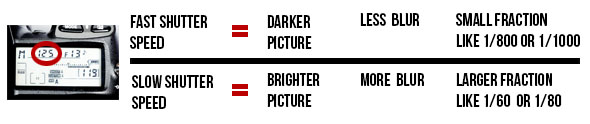
The shutter is a small “curtain” in the camera that quickly rolls over the image sensor (the digital version of film) and allows light to shine onto the imaging sensor for a fraction of a second. The longer the shutter allows light to shine onto the image sensor, the brighter the picture since more light is gathered.  A darker picture is produced when the shutter moves very quickly and only allows light to touch the imaging sensor for a tiny fraction of a second. The duration that the shutter allows light onto the image sensor is called the shutter speed, and is measured in fractions of a second.  So a shuttedr speed of 1/2 of a second will allow more light to touch the image sensor and will produce a brighter picture than a shutter speed of 1/200 of a second. So if you’re taking a picture an it is too dark, you could use a slower shutter speed to allow the camera to gather more light.
Example picture of motion blur caused by too slow of a shutter speed.
THAT’S ME! TYPING AWAY ON THIS ARTICLE FROM MY STUDIO IN CALDWELL, IDAHO.
Just as the aperture affects the exposure as well as the depth-of field, the shutter affects more than just the exposure.  The shutter speed is also principally responsible for controlling the amount of blur in a picture. If you think about it, it makes sense that the shutter speed controls how much blur is in the picture.
Imagine me sitting here at my computer desk waving to you (you don’t have to imagine very hard if you just look at the picture on the right).If you take a picture of me with a shutter speed of 1/30th of a second, then my hand will have moved in the time that the camera is recording the picture.  To get rid of the blur, you need to increase the shutter speed to around 1/320th of a second.  At this speed, my hand is still moving, but the camera takes the picture so fast that my hand travels only such a small distance that it is not noticeable in the picture.
Graphic explaining the effects of changing the shutter speed
.


ISO

The funny thing about ISO is that it is an acronym, but nobody really knows what it stands for.  It is always just called ISO even though it really stands for International Organization for Standardization.  Every once in a while, you’ll hear an older photographer pronounce it “I-so”, but almost everyone pronounces it “I.S.O.” The ISO controls the exposure by using software in the camera to make it extra sensitive to light.
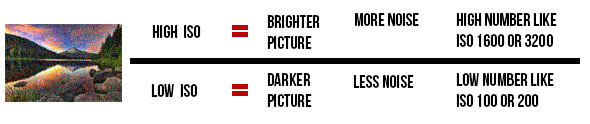
A high ISO such as ISO 1,600 will produce a brighter picture than a lower ISO such as ISO 100. The drawback to increasing the ISO is that it makes the picture noisier.  Digital noise is apparent when a photo looks grainy. Have you ever taken a picture at night with your cell phone or your pocket camera, and noticed that it looks really grainy?  That is because the camera tried to compensate for the dark scene by choosing a high ISO, which causes more grain.
What constitutes a “high” ISO is constantly changing.  Camera companies are constantly improving the ability of cameras to use high ISOs without as much grain.  A few years ago, only the highest-end pro DSLR cameras could achieve 2,000 ISO, and now even entry-level DSLR cameras can shoot at this level.  Since each camera is different, you would do well to do a few tests with your camera to see how high of an ISO you can shoot at without making the image overly grainy.
Right now, you will commonly find new DSLRs that advertise expandable ISO ranges. To learn more about that, click here.
A graphic explanation of how ISO settings work in basic photography
.

PUTTING IT ALL TOGETHER

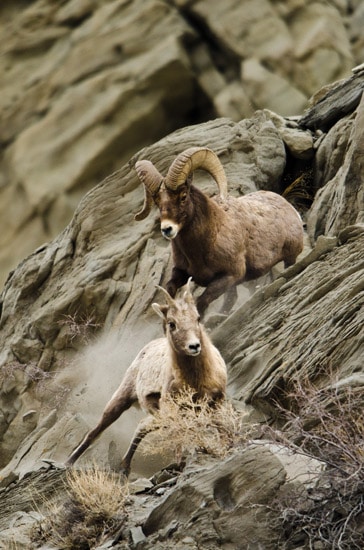
A ram attempting to mate with a ewe bighorn sheep in Yellowstone.
BIGHORN SHEEP IN YELLOWSTONE NATIONAL PARK
I know exactly what you’re thinking: “Why do I need three tools to control the exposure!?!?  Wouldn’t one suffice?”  The answer is no, and I’ll explain why with an example. In January 2012, I took a trip to my favorite place on the planet to take pictures–Yellowstone National Park.  My guide informed us that the bighorn sheep in the park were dying off very quickly due to whooping cough, so I worked hard that week to capture pictures of the last few sheep in that area of the park. Around 9AM on a cloudy day, I found a small group of bighorn sheep and started photographing them with a long 600mm lens.  The early hour and clouded sky made the situation quite dark for shooting.
The lens I was working with (which costs $11,000–don’t they know I’ve gotta send my kids to college?)… Anyway, it had a maximum aperture size of f/4.  So I set my aperture at f/4 to gather as much light as possible.  This also impacted the depth-of field to blur out the rocks behind the bighorn sheep. Next, I set my shutter speed.  I wanted to capture action in the photo, so I set my camera to 1/1000th of a second shutter speed.  I knew that this fast of a shutter speed would prevent any motion blur from the sheep running on the mountain side. Then, I took a picture.  WAAAY too dark!  I couldn’t compromise my shutter speed or aperture, so I knew I needed to use the third player in the exposure triangle–the ISO.
I played around with my ISO and found that if I increased it to ISO 640, it made the picture bright enough to take the picture without making it overly grainy. Yahtzee!  This combination of shutter speed, aperture, and ISO worked out perfectly.  Now can you see why you need to know how to shutter, aperture, AND ISO, and know how to set them independently on your camera?
In part 3 of the Photo Basics Series, I’m going to teach you how to set these on your camera.


Some research on world famous Photography :

World best photographer
1. Michael Kenna (is an English photographer best known for his black & white landscapes.)
2. Nicholas Samaras ( is one of the most passionate and committed underwater photographers. His love and dedication to sea and its creatures in combination with his characteristic effort to bring out to surface the beauty of the marine world with a unique aesthetics)
3. Dorothea Lange (she took photographs during the Great Depression.  one of the best-known photographs in history.)
4. Ansel Adams  ( His landscapes are stunning !)

5. Timothy Hogan (He is a still life photographer )


Gold Award Winner rankings TOP 5 for 2015:

1.      Canon EOS 1D X   
2.      Nikon D800
3.     Canon EOS 5D Mark III   
4.      Sony Alpha A99
5.   Nikon D7000   


2


This one is a example and a reference for the photography class ! 


Channel ID (Shape)

1.This one is channel ID with all basic polygon shape .


2.Editing process + Animating Process .


3.Add in some effect for the text and camera .


Final in youtube :  https://www.youtube.com/watch?v=ZW6VwIXU2eY


Further Reading about Photoshop new Features-Content Aware

Source from : http://www.photoshopessentials.com/photo-editing/content-aware-fill-cs5/


In a previous tutorial, we looked at Photoshop CS5's upgraded Spot Healing Brush with its brand new Content-Aware Healing option that lets Photoshop examine the actual contents of your image as it tries to figure out the best way to remove or repair the damaged or unwanted area you've clicked on. This time, we look at another new feature in Photoshop CS5 - Content-Aware Fill. It's no coincidence that both of these new features share similar names, since they do pretty much the same thing. The main difference is in how we use them.
Both features let Photoshop analyze the contents of the image to figure out what the photo would have looked like if the unwanted object or area had never been there. But even with its new Content-Aware abilities, the Spot Healing Brush is still best suited for smaller areas that we can easily click on or paint over. Content-Aware Fill, on the other hand, lets us repair or replace larger, more complex areas, and even multiple areas at once, simply by drawing selections around them and letting Photoshop do the rest!


Philospohy about Parallax Effect and some task contributing to this effect.

This is some research on Parallax Effect ,it's in video form and these video showing that some example and some profeesional work.


First of all , I will talk about what is parallax effect .Parallax effect means a short animation by using a still-photo . In other words, we download a image from the web and then we animated the image in After Effect .

This is some of the image that I downloaded from the web .


1. We open the photo that we recently downloaded in photoshop. Hence , we use lasor tool to cut out the main object or the object you want to animate. For,example, I cut out the panda in this image

2.After cutting finished with the lasor tool. Then click>Copy >Paste . There will be a new layer of the panda (object). Therefore ,it'll become like this .


3.Next, we need to animated in the After effect. So ,before we move into after effect, we need a foreground and a background. Use lasor tool again to cut the front area /surface to make it look 3d while comes to AE.

4.After that , Click the *background layer and then go to > Edit> Fill > Content aware . Then , you should be able to get this kind of image .


5.Same goes to this one too. This one is the original image.


6.First, cut out the tiger.


7.Hence, cut out the water splash too. If found that that is very difficult to cut the water ,you can try magic wand and diselect the thing  you don't want to cut.


8.After that,click the background layer >Edit>Fill>Content Aware.


9.This one also the same .


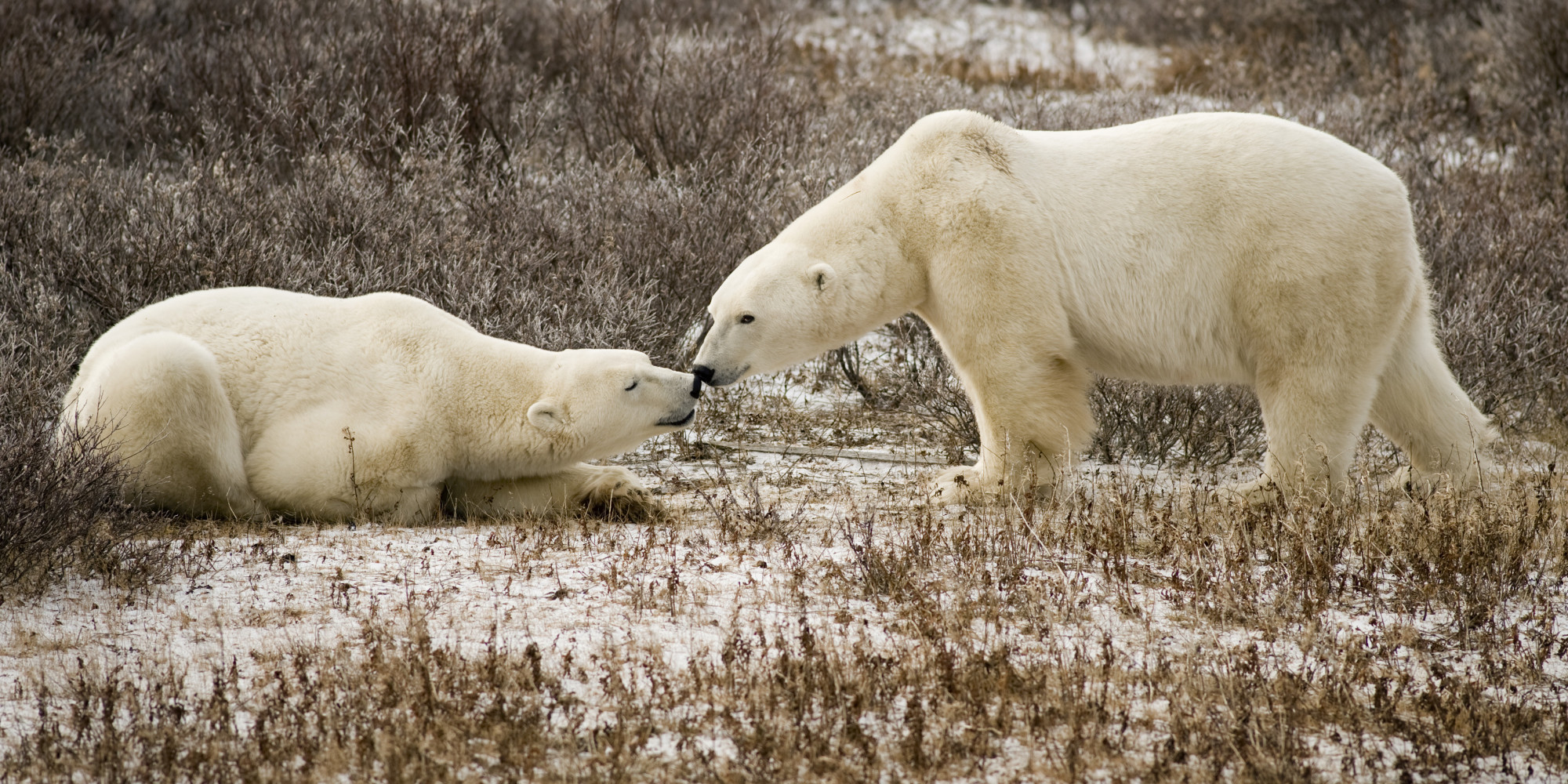
10.First , cut out the polar bear .


11.select the left polar bear together with the right side polar bear , and then click> Merge layer.


12.This will obtained if use the same way too. Select the background layer > edit>fill>content aware .


13.After that, open AE,import the PS file and before that create a new composition . Just hold Ctrl+N.Start editing . Can use one of the features called Puppet pin, which allow us to move the object or animate the object.


14.Can adjust the color also by using color correction . After that ,you can add some effect ,such as camera lens blur effect , text effect (Words) ,or depth of field of the camera .


15.Adjust the camera and it is better to move the background at the back and the object infront .This will make the 3D feel and if the camera zoom in , the background become blur (Increase the Aperture too).


16.Add audio to make it more nicer. 


17.After finished editing , I start rendering by clicking Ctrl+M (add render Queue). Check some of the setting is it corresct and suitable .


18.Final video of parallax effect on youtube :